
⭐ Free Chrome extension · VLINK ASIA
SEO Tools PRO: Instant On-Page SEO Audit
Right in Your Browser
One click. A full professional SEO report directly inside Chrome. No login. No usage limits. No cost. Runs 100% locally — no data leaves your device.
- ✓ Free forever
- ✓ No login required
- ✓ Unlimited use
- ✓ 100% local processing
- ✓ Dark mode built-in
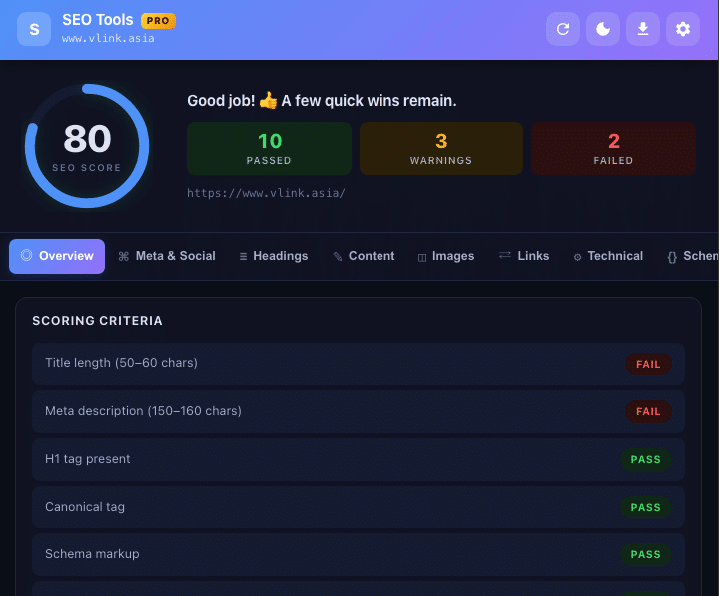
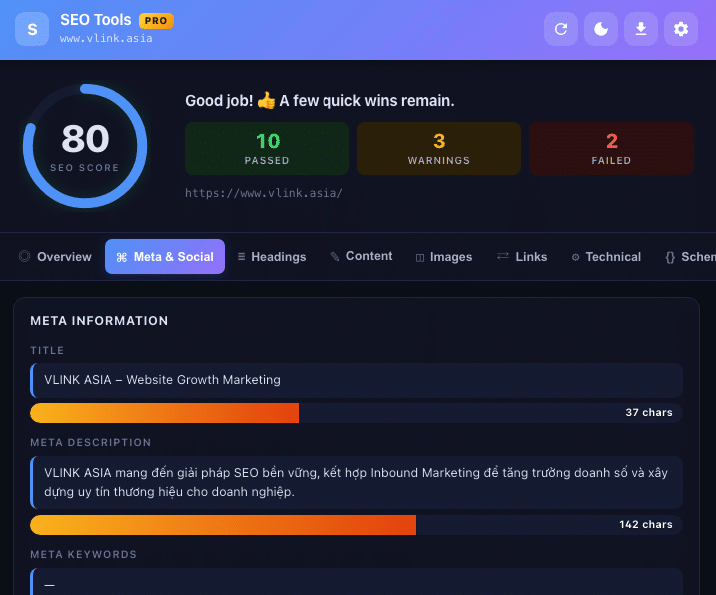
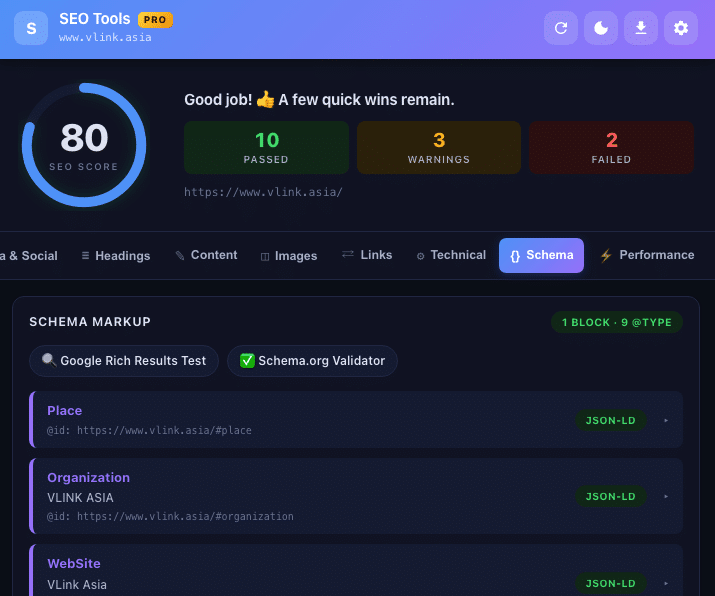
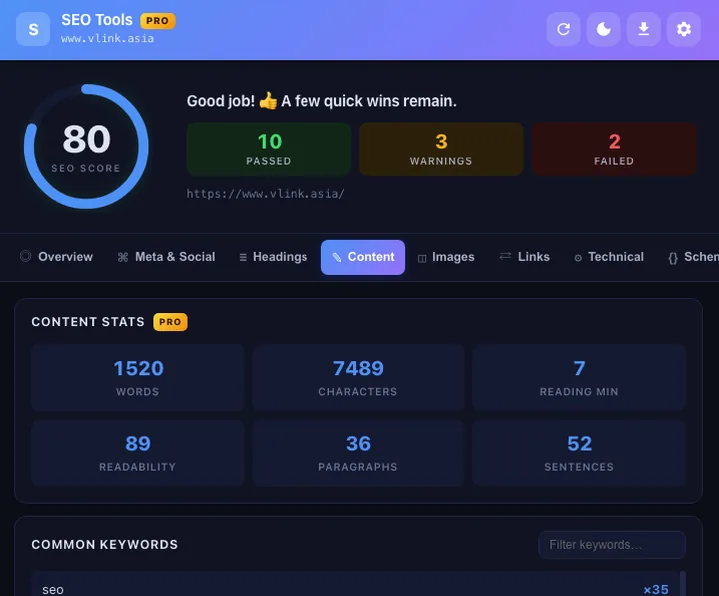
SEO Tools PRO is a Chrome extension developed by VLINK ASIA that audits 16 on-page SEO factors of any open tab in under 5 seconds. Results appear in a 9-tab dashboard with a 100-point SEO score, dynamic scoring bands, and clear pass / warn / fail classification for every factor. All processing happens locally in your browser — no data ever leaves your device.
What is SEO Tools PRO?
SEO Tools PRO is a Chrome extension that analyzes every on-page SEO factor of the currently open tab directly inside the browser popup — no extra tab, no URL copying, no account. Click the extension icon and a full audit appears instantly.
How is it different from Google Search Console?
Google Search Console requires ownership verification and has a data delay of 1 to 3 days. SEO Tools PRO delivers results in real time and audits any URL open in Chrome, including competitor sites, staging environments, and localhost. The two tools serve different moments in the same SEO workflow.
Who built SEO Tools PRO?
SEO Tools PRO was built by VLINK ASIA, an SEO training and consulting company based in Ho Chi Minh City, Vietnam, running the SEO Master course and a community of over 130,000 SEO practitioners.
Why do professionals need another SEO checking tool?
SEO practitioners audit dozens of URLs daily while actively optimizing. Opening DevTools or waiting for a full-site crawler does not fit that rhythm. SEO Tools PRO fills exactly that gap: instant results in a popup without leaving the page you are working on.
“Google Search Console is a free tool from Google for monitoring website performance in search results. Every SEO professional must use it — but it only provides data after Google has already crawled the page, not while you are actively optimizing.”
How the 100-point SEO score works
The overall score is a weighted sum across 16 on-page factors grouped into three bands:
Does Google use this score for ranking?
No. This is an internal scoring system built by VLINK ASIA to help prioritize fixes — not a Google ranking signal. A page at 90 can still rank poorly if content mismatches search intent or lacks authority. A page below 50 almost always has a technical error actively blocking indexing.
What issues do pages below 50 typically have?
At minimum one blocking error: missing canonical tag, robots disallow rule, missing H1, missing meta description, or incorrectly configured HTTPS.
What are the 16 on-page factors checked?
| Group | Factors checked | Impact level |
|---|---|---|
| Meta tags | Title, meta description, canonical, robots, hreflang | High |
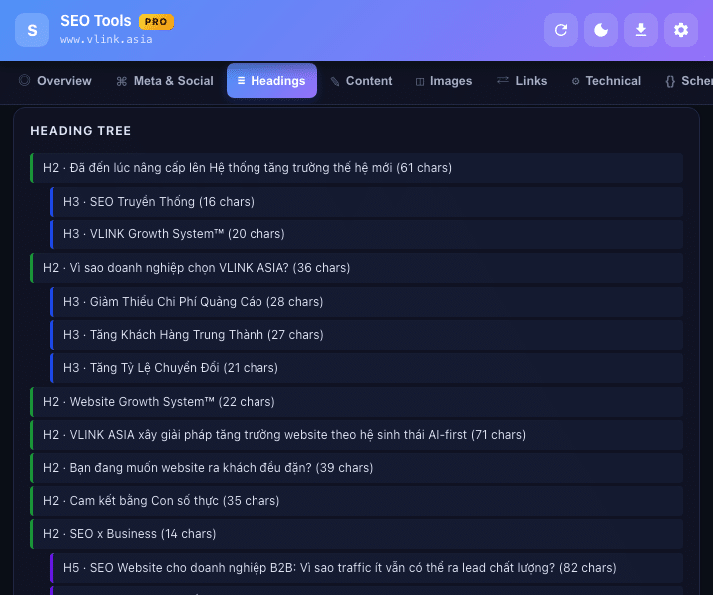
| Heading structure | Single H1, H1–H6 order, total heading count | High |
| Technical | HTTPS, viewport, charset, HTML lang, X-Robots-Tag | High |
| Images | Alt text, width/height attributes, lazy loading status | Medium |
| Links | Empty anchor text, nofollow, internal/external ratio | Medium |
| Schema | Valid JSON-LD, @graph depth, link to Rich Results Test | Medium |
| Performance | TTFB, FCP, DOMContentLoaded, total page weight | Medium |
| Content | Word count, Flesch Readability score, keyword density | Medium |
11 core features — all completely free
All 11 feature groups below are available immediately after installation from the Chrome Web Store. No usage limits, no account required, no hidden paid version.
Schema.org JSON-LD Reader — why reading @graph matters
RankMath, Yoast, and Schema App consolidate multiple entities — WebPage, Organization, BreadcrumbList — into a single @graph array. This is Google’s recommended approach: fewer HTTP requests and cleaner @id cross-references between entities.
How older tools miss @graph entirely
Many Schema checkers read only the first JSON-LD script tag in the DOM and stop. When all Schema lives in @graph inside the second script tag, those tools incorrectly report no Schema found. SEO Tools PRO scans all script tags and parses @graph in full.
Direct link to Google Rich Results Test
After parsing Schema, SEO Tools PRO provides a direct link to Google Rich Results Test for the current page — required before claiming AEO or AI Overviews eligibility.
SEO Tools PRO vs other SEO checking tools
SEO Tools PRO complements Google Search Console and Screaming Frog — it does not replace them. The three tools serve three different moments in the same workflow.
| Criterion | SEO Tools PRO | Google Search Console | Screaming Frog |
|---|---|---|---|
| Cost | Completely free | Free | Free up to 500 URLs; paid full-site |
| Login / verification | None | Google account + site verification | None |
| Audit competitor sites | Yes | No | Yes |
| Time to results | Instant (under 5 s) | 1–3 day delay | Minutes to hours |
| Full-site crawl | No (single URL) | Yes | Yes |
| Real Google data | No | Yes | No |
| Schema / JSON-LD @graph | Yes, incl. @graph | No | Paid only |
| Keyword density n-gram | Yes (1, 2, 3-gram) | No | No |
| Flesch Readability | Yes | No | No |
| Report export | JSON, CSV, HTML, Clipboard | CSV (limited) | Multiple formats |
| Localhost / staging | Yes | No | Yes |
| Data privacy | 100% local | Sends to Google | Runs locally |
“A browser extension is a small software module for customizing a web browser. Browsers typically allow a variety of extensions, including user interface modifications, cookie management, ad blocking, and the custom scripting and styling of web pages.”
Page performance — TTFB, FCP, and Core Web Vitals
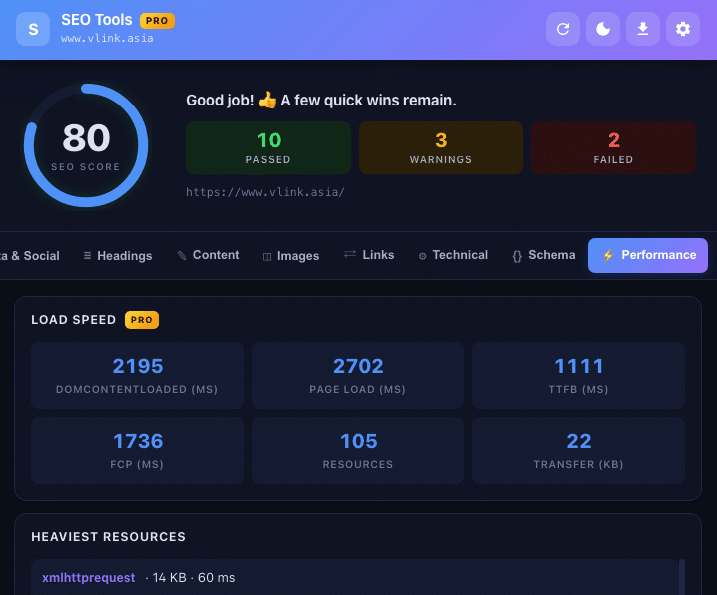
SEO Tools PRO reads directly from the browser’s Navigation Timing API and Resource Timing API, delivering results that reflect real user experience on the current device — not lab data from an external server.
What is TTFB and when should you act?
TTFB (Time to First Byte) measures from request sent to first byte received, reflecting hosting speed, caching, and CDN. Redirect chains (RFC 9110 §15.4) inflate TTFB because each hop adds a full round-trip. TTFB above 600 ms typically points to hosting tier, caching plugin, or missing CDN. See Google Search Central: Core Web Vitals.
How does FCP affect ranking?
FCP (First Contentful Paint) measures time until the first content appears on screen. Google uses Core Web Vitals — where LCP is closely related to FCP — as a ranking signal especially on mobile. FCP above 1.8 seconds on a typical connection warrants investigation.
Top 10 heaviest resources
SEO Tools PRO lists the 10 largest resources loading on the page: images, JavaScript, CSS. The fastest starting point for reducing total page weight without running a full Lighthouse audit.
| Metric | Good | Needs improvement | Poor | SEO Tools PRO data source |
|---|---|---|---|---|
| TTFB | Below 600 ms | 600 ms – 1800 ms | Above 1800 ms | Navigation Timing API · responseStart |
| FCP (First Contentful Paint) | Below 1.8 s | 1.8 s – 3.0 s | Above 3.0 s | Paint Timing API · first-contentful-paint |
| DOMContentLoaded | Below 2.0 s | 2.0 s – 4.0 s | Above 4.0 s | Navigation Timing API · domContentLoadedEventEnd |
| Total page weight | Below 1 MB | 1 MB – 3 MB | Above 3 MB | Resource Timing API · transferSize (cumulative) |
| Redirect hops (RFC 9110 §15.4) | 0 hops | 1 hop | 2 or more hops | HEAD probe + Location header tracking |
Link analysis — internal, external, and rel attributes
SEO Tools PRO classifies every link: internal, external, nofollow, sponsored, ugc, empty anchors, and missing anchor text. Filter by type and jump directly to link targets.
Why distinguish nofollow, sponsored, and ugc?
Google treats these three differently (RFC 8288 §3.3, extended by Google Search Central): rel=”sponsored” for paid or advertising links, rel=”ugc” for user-generated content, and rel=”nofollow” for all other cases. Misuse can trigger a spam policy violation. Reference: Google Search Central: qualify outbound links.
Why does empty anchor text matter for SEO?
Links with empty or non-semantic anchor text pass no topical signal to Google about the destination page. SEO Tools PRO flags and lists all such links so they can be reviewed and prioritized for repair.
| rel value | Standard | Meaning | When to use | SEO Tools PRO detects |
|---|---|---|---|---|
nofollow |
Google Search Central (RFC 8288 extension) | No PageRank transfer to destination | Unverified or un-endorsed links | Yes |
sponsored |
Google Search Central (RFC 8288 extension) | Paid or advertising link | Banners, affiliate links, sponsored content | Yes |
ugc |
Google Search Central (RFC 8288 extension) | User-generated content | Comments, forums, reviews | Yes |
alternate |
RFC 8288 §6.7.1 — IANA-registered | Alternate version of the page | hreflang, AMP, RSS feeds | Yes |
noopener |
HTML Living Standard §7.1.5.1 | New tab cannot access window.opener | All external target=”_blank” links | Yes |
Keyword density and stop word filtering
The keyword density analyzer supports three n-gram levels: unigrams, bigrams, and trigrams. Results include percentage bars for easy comparison of repetition levels.
Why is a separate stop word list for Vietnamese necessary?
Vietnamese has many high-frequency function words — “và” (and), “của” (of), “là” (is) — that appear uniformly across all content. Without filtering them, these words dominate results and hide the keyword phrases that actually matter. SEO Tools PRO includes a dedicated Vietnamese stop word list alongside the English one.
What keyword density is appropriate?
Google does not publish a target. Per Google Search Essentials spam policies, the principle is to write for readers, not to stuff keywords. Topical vocabulary coverage across the full subject matters more than density. Learn more in the SEO Master course.
Technical SEO check — robots.txt, sitemap.xml, and more
The technical check group covers factors that directly affect how Googlebot crawls and indexes pages.
Why audit robots.txt inside the extension?
A single robots.txt misconfiguration (RFC 9309) can block Googlebot from an entire website with no direct warning. SEO Tools PRO probes the file using HEAD (RFC 9110 §9.3.2); if the server returns 405, it falls back to Range-GET (RFC 9110 §14.2). Any 3xx redirect chain on robots.txt is also reported (RFC 9110 §15.4). Reference: Google Search Central: intro to robots.txt.
What is X-Robots-Tag?
X-Robots-Tag is an indexing directive delivered via HTTP response header (RFC 9110 §7.4) rather than an HTML meta tag — applicable to PDFs, images, and other non-HTML resources. SEO Tools PRO reads and displays the X-Robots-Tag value when present.
| Type / Directive | RFC / Source | SEO meaning | Googlebot behavior | SEO Tools PRO detects |
|---|---|---|---|---|
| 301 Moved Permanently | RFC 9110 §15.4.2 | Transfers all ranking signals to new URL | Updates index, passes PageRank | Yes |
| 302 Found | RFC 9110 §15.4.3 | Temporary redirect; signals stay on original | Crawls both URLs; no PageRank transfer | Yes |
| 307 Temporary Redirect | RFC 9110 §15.4.8 | Method-preserving temporary redirect | Similar to 302, method-safe | Yes |
| 308 Permanent Redirect | RFC 9110 §15.4.9 | Method-preserving permanent redirect | Similar to 301, method-safe | Yes |
| X-Robots-Tag: noindex | RFC 9110 §7.4 · Google Search Central | Prevents indexing; applies to non-HTML resources | Crawls but does not index | Yes |
| robots.txt Disallow | RFC 9309 · HEAD (RFC 9110 §9.3.2) | Blocks crawl; does not prevent index via inlinks | Does not crawl; may still index from inlinks | Yes |
Do Open Graph and Twitter Card affect SEO?
Not directly as ranking signals, but missing Open Graph tags cause shared links on Facebook or X to display incorrectly or use the wrong image, reducing click-through rates from social media.
Who should use SEO Tools PRO?
How to install SEO Tools PRO in 2 minutes
-
Open the Chrome Web StoreGo to the SEO Tools PRO listing using the link below. Requires Google Chrome version 90 or later.
-
Click “Add to Chrome”A permissions dialog appears. The extension requests only the activeTab permission to read content of the currently open tab.
-
Confirm installationClick “Add extension.” Download and installation complete automatically within a few seconds.
-
Pin the extension to your toolbarClick the puzzle piece icon at the top-right of Chrome, find SEO Tools PRO, and click the pin icon.
-
Navigate to any page and start auditingGo to the page you want to audit, click the SEO Tools PRO icon. The full 9-tab report appears instantly.
Requires Google Chrome 90+ · Compatible with Microsoft Edge
After installing, the SEO Wiki by VLINK ASIA explains every metric in detail. To build a solid SEO foundation, SEO Launchpad covers the essentials in 8 sessions. For the full practical SEO workflow, SEO Master covers Technical Clinic, Cluster IA, and AEO across 36 sessions.
Frequently asked questions about SEO Tools PRO
Is SEO Tools PRO really free, or is there a hidden paid version?
Completely free with no usage limits and no hidden paid tier. All 11 feature groups are available immediately after installation from the Chrome Web Store — no email address, no credit card, no account registration required.
Can I audit competitor websites or any URL I want?
Yes. SEO Tools PRO audits any URL currently open in Chrome, including competitor sites, staging environments, and localhost — with no site ownership verification required. This is a key difference from Google Search Console.
Does the 100-point score reflect how Google ranks the page?
No. This is an internal scoring system built by VLINK ASIA to prioritize technical fixes — not a Google ranking signal. A page at 90 points can still rank poorly if content mismatches search intent or lacks authority. A page below 50 almost always has a technical error actively blocking indexing.
Why can SEO Tools PRO read @graph in JSON-LD when most other tools cannot?
RankMath, Yoast, and Schema App bundle multiple entities into a single @graph array. Many older tools read only the first JSON-LD script tag and stop, missing everything in @graph. SEO Tools PRO scans all script tags and parses the full @graph structure, then links directly to Google Rich Results Test — the required verification step for AEO or AI Overviews eligibility.
TTFB is above 600 ms — what should I do?
TTFB above 600 ms is worth investigating. The three most common root causes are an underpowered hosting tier, no caching plugin, and no CDN. Redirect chains (RFC 9110 §15.4) also inflate TTFB since each hop adds a round-trip. Measure at several different times before deciding to upgrade infrastructure.
Can I audit pages running on localhost during development?
Yes. Because SEO Tools PRO processes entirely in the browser, it can audit any URL Chrome can open, including localhost (RFC 3986 §3.2.2) and internal IP addresses. Particularly useful for developers verifying JSON-LD Schema, Open Graph, and heading structure before pushing to staging or production.
What happens if robots.txt is misconfigured?
A misconfigured robots.txt (RFC 9309) can block Googlebot from an entire website with no direct notification. This is the most severe and most common error introduced after WordPress migrations or updates. SEO Tools PRO automatically probes the file with a HEAD request (RFC 9110 §9.3.2) on every audit.
Does SEO Tools PRO work with Microsoft Edge?
Yes. Microsoft Edge is Chromium-based and supports Chrome Web Store extensions natively. Install from the Chrome Web Store while in Edge and it works with full functionality — same 11 feature groups, same 100-point scoring, same local processing with no data transmitted.
Can SEO Tools PRO replace my paid SaaS SEO platform?
No. SEO Tools PRO handles real-time on-page analysis for individual URLs while you are actively optimizing. Paid SaaS platforms are stronger for rank tracking, large-scale site crawls, backlink data, and historical trends. The two serve different moments in the same workflow and work best used together. See VLINK ASIA’s SEO tools guide.
I am new to SEO — should I start with SEO Tools PRO or Google Search Console?
Use both from the start — they serve different purposes. SEO Tools PRO lets you observe on-page factors on any page while learning, building strong pattern recognition fast. Google Search Console shows how Google actually processes your own website. SEO Launchpad covers foundations in 8 sessions. SEO Master is the full roadmap for professional-level work.
Will fixing the issues SEO Tools PRO finds actually help my site rank?
Fixing technical errors removes barriers — it does not automatically create rankings. Think of it as a temperature reading: it tells you something is wrong, it is not the cure. Rankings depend on content quality, intent match, authority, and many other factors. That said, pages below 50 almost always have errors actively blocking indexing — fixing those first delivers the highest ROI of any technical SEO action.
Does SEO Tools PRO handle Vietnamese language content accurately?
Yes. The keyword density analyzer includes a dedicated Vietnamese stop word list alongside the English one, ensuring Vietnamese pages produce accurate n-gram results without noise from high-frequency function words. VLINK ASIA is based in Vietnam and SEO Tools PRO is built specifically to handle Vietnamese content correctly — a gap that most international tools leave unfilled.